

Mobile & Stationary Computer Workstations
The adjustable computer workstation line: full workstations in mobile and stationary builds.
Home » Hospital & Durable Medical Equipment » Computer Carts & Desks » Mobile & Stationary Computer Workstations
The Full Station, Anywhere
Past stands lie full workstations: complete computer work points in mobile and stationary builds, with the adjustable height line carrying sit-stand duty. Specifications per model cover surfaces, capacity and adjustment.
Shop The Mobile & Stationary Computer Workstations Range by Type
Each line opens its models with specifications per product.

Shop Mobile & Stationary Computer Workstations
Everything MSEC carries in Mobile & Stationary Computer Workstations, shown in full. Specifications are supplied by the manufacturer. For current pricing, lead time or a quote on a purchase order, call toll free 877-706-4480.
-
 Quick ViewSelect options

What Are Mobile and Stationary Computer Workstations?
Computer workstations are furniture designed to hold computers, monitors, keyboards, scanners and printers in clinical environments. Mobile workstations roll on casters so clinicians can bring the computer into patient rooms for documentation, medication administration and bedside assessments. Stationary workstations stay in one place, anchoring charting areas at nurse stations, medication rooms and unit alcoves. Both are built for healthcare use, with surfaces that tolerate disinfectants, cable management that keeps cords organized and designs that support ergonomic work. Hospitals, clinics, long term care facilities, rehabilitation centers and surgery centers use them to support electronic health records. Each product listing gives specifications per model, including work surface dimensions, mounting options, height range, storage and power features. Choosing between mobile and stationary designs depends on where documentation happens and how the computer will be used.
When Should a Facility Choose Mobile Workstations?
Mobile workstations suit workflows where documentation happens at the bedside. Medication administration with barcode scanning requires the computer and scanner to be with the nurse at the patient’s side. Bedside assessments, admission interviews and patient education are also easier when the computer comes to the patient. Mobile workstations let the clinician document in real time rather than recalling details later at a station, which can improve accuracy. They also allow a single workstation to serve multiple rooms. The tradeoff is that mobile workstations take space in rooms and corridors and must be cleaned as they move between patients. Facilities often deploy mobile workstations for nurses on medication passes and assessments while using stationary workstations for other documentation.
When Are Stationary Workstations the Better Choice?
Stationary workstations suit documentation that does not need to happen at the bedside, such as order entry, care planning, reviewing results and administrative work. They anchor charting areas where clinicians can sit or stand to work, often with larger monitors and more storage than a mobile cart. Because they stay in one place, they can connect to wired networks and power and do not need batteries. Stationary workstations reduce corridor clutter compared with carts parked outside rooms. Many units have a mix, with stationary workstations at nurse stations and mobile carts for bedside tasks.
What Hardware Must the Workstation Support?
A workstation must fit the specific devices the facility deploys. This may include a laptop or all in one computer, external monitors, keyboard and mouse, barcode scanner, label or wristband printer and sometimes a signature pad or card reader. Each device needs a secure mounting point or surface, and the workstation’s weight rating must accommodate the total load. Monitor mounts should match the monitor’s mounting pattern. Cable management should route cords neatly to prevent snagging and simplify cleaning. Involving the IT department to confirm the hardware list ensures the workstation will support every device. Listings give platform dimensions, mount compatibility and weight capacity.
How Important Is Height Adjustability?
Workstations are shared by many users across shifts, and people differ in height. A workstation that cannot adjust forces some users to hunch and others to reach, which leads to discomfort over long shifts. Height adjustable workstations let each user set a comfortable work surface and monitor height, whether sitting or standing. Adjustment mechanisms include manual cranks, pneumatic assists and electric lifts. Faster mechanisms encourage staff to adjust the workstation rather than accepting the previous user’s setting. Monitor arms that tilt and swivel add further adjustment. Listings give height ranges and adjustment types.
Do Mobile Workstations Need Power Systems?
Mobile workstations used for extended periods away from outlets often include battery systems that power the computer and peripherals. Battery capacity determines how long the workstation can run between charges. Hot swappable batteries allow a depleted battery to be replaced without shutting down equipment. Charging stations for spare batteries need a location on the unit. Workstations that use laptops with their own batteries may not need a separate power system if the laptop battery lasts through the workflow. Facilities should consider how long workstations are used between charging opportunities. Listings describe battery capacity, charging and swap features.
What Storage Do Workstations Offer?
Many workstations include drawers, bins or baskets for supplies used during documentation and bedside tasks, such as gloves, wipes, specimen labels and small clinical supplies. Locking drawers secure items that require protection. Storage should be sized to the workflow, since excessive storage makes carts heavier and can collect clutter. Some medication administration workstations include medication drawers that combine computing with medication storage. Listings describe storage configurations.
How Do Workstations Support Infection Prevention?
Mobile workstations travel between patient rooms and can carry contamination if not cleaned properly. Facilities should establish procedures for cleaning workstations between patients or at set intervals, including keyboards, mice, scanners, handles and work surfaces. Washable or sealed keyboards make cleaning easier. Some facilities dedicate workstations to isolation rooms or keep them outside the room. Surfaces should tolerate approved disinfectants. Involving infection prevention in selecting and deploying workstations helps ensure they support cleaning protocols.
How Are Workstations Maintained?
Maintenance includes checking casters for smooth rolling and secure locking, testing height adjustment mechanisms, inspecting monitor mounts and arms, checking cable management and replacing worn components. Powered workstations need battery inspection and replacement as capacity declines. Standardizing workstation models simplifies parts and training. A regular inspection schedule catches problems early.
How Does Workstation Size Affect Use?
Mobile workstations must fit through doorways, maneuver in patient rooms and park in corridors without blocking traffic or violating fire code clearances. Compact designs are easier to move but may hold fewer devices. Stationary workstations must fit the available space at stations and alcoves. Measuring spaces and routes before ordering ensures a good fit. Listings provide dimensions.
What Accessories Are Available?
Accessories include scanner holders, printer shelves, monitor arms, keyboard trays, storage bins, sharps holders, glove holders and wipe dispensers. They allow workstations to be configured for specific workflows. Compatibility depends on the workstation model.
Where Are Workstations Used?
Hospitals use workstations on inpatient units, emergency departments, procedure areas and outpatient clinics. Long term care facilities use them for resident documentation. Surgery centers use them in pre operative and recovery areas. Clinics use them in exam rooms and nurse stations.
How Do Facilities Order Workstations?
Orders typically start with IT and clinical leaders defining standards for mobile and stationary workstations, including hardware, power and height requirements, then ordering by unit. MSEC quotes unit and facility orders, accepts purchase orders from hospitals, clinics, long term care facilities and government buyers, and offers GSA contract pricing for federal and VA facilities. The order desk at 877-706-4480 can help match workstations to hardware lists before anything ships.
How Do Workstations Support Barcode Medication Administration?
Barcode medication administration is a process in which the nurse scans the patient’s wristband and the medication’s barcode before giving a dose, and the system checks that the right medication is going to the right patient at the right time. This process depends on having the computer and scanner at the bedside. Mobile workstations make that possible, carrying the computer, scanner and often medications in locked drawers from room to room. The workstation’s design affects how smoothly the process works. A scanner holder within easy reach, a screen at a comfortable viewing height, enough battery life to complete the medication pass and a work surface for preparing medications all contribute. If the workstation is awkward to use, nurses may be tempted to work around the process, which defeats its purpose. Choosing workstations designed for medication administration workflows, and involving nurses in the selection, helps the process work as intended.
How Many Workstations Does a Unit Need?
The number of workstations depends on the unit’s staffing, workflows and documentation requirements. For mobile workstations used during medication passes, a common approach is one workstation per nurse working at the same time, so no one waits for a cart during the pass. Additional workstations may be needed for respiratory therapists, physicians and other team members who document at the bedside. Stationary workstations at nurse stations should accommodate the number of staff who chart there during busy periods, including physicians reviewing records and entering orders. Spare mobile workstations allow coverage when carts are being cleaned, charged or repaired. Reviewing peak staffing levels and observing documentation patterns helps determine the right number. Facilities often find that underestimating workstation needs leads to staff waiting or documenting later, which can affect accuracy, so planning for peak demand is worthwhile.
Frequently Asked Questions
What is the difference between mobile and stationary workstations?
Mobile workstations roll to the bedside for documentation during care. Stationary workstations stay in one place at stations and alcoves.
Do mobile workstations need batteries?
If they run equipment away from outlets for extended periods, yes. Workstations using laptops may rely on the laptop battery.
How do I know a workstation fits our hardware?
Compare platform dimensions, monitor mount patterns and weight capacity with your IT team’s device list.
Why choose a height adjustable workstation?
Height adjustment lets each user set a comfortable standing or seated position, supporting ergonomics across shifts.
How should mobile workstations be cleaned?
Clean keyboards, scanners, handles and surfaces with approved disinfectants between patients or at set intervals.
Can MSEC quote computer workstations?
Yes. MSEC accepts purchase orders and offers GSA contract pricing for federal and VA facilities. Call 877-706-4480 or 713-706-4480.
Related Hospital Equipment Categories
More lines from Computer Carts & Desks and the wider Hospital department.
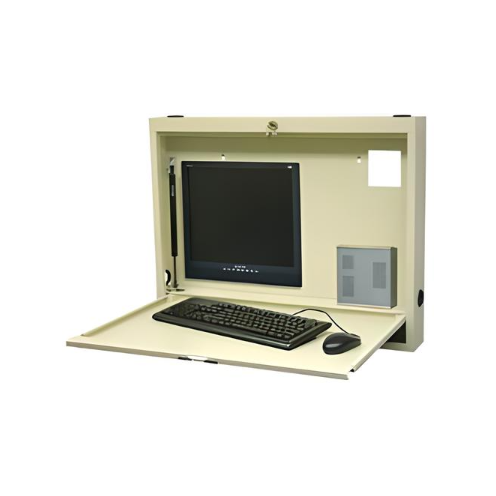
Wall Mounted Desks & Workstations
13 products

Laptop & Computer Stands
6 products
Talk to a Medical Equipment Specialist
Toll free 877-706-4480 | Local 713-706-4480 | inquiry@msecompany.net