

Computer Carts & Desks
Twenty mobile computing and documentation pieces across three lines: the carts and desks that carry the chart to the bedside.
Home » Hospital & Durable Medical Equipment » Computer Carts & Desks
Documentation That Moves With Care
Charting happens where the patient is, and the equipment that makes that workable is the mobile computing cart and the compact clinical desk. The lines here cover powered and non powered carts plus stationary documentation desks, built for shifts of rolling, typing and wiping down.
Shop The Computer Carts & Desks Lines by Type
Every line in the family with its catalog count.
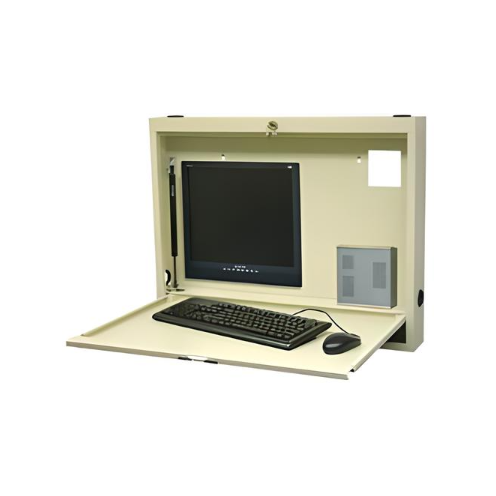
Wall Mounted Desks & Workstations
13 products

Laptop & Computer Stands
6 products
What Does the Computer Carts and Desks Family Cover?
Electronic health records moved documentation to the point of care, and this family covers the furniture that makes that possible. It includes mobile and stationary computer workstations, rolling computer stands, rolling laptop stands, laptop computer stands, adjustable height workstations and tables, wall mounted desks, and fuller wall mounted workstations that house a computer inside a fold away cabinet. Each line has its own page with products and specifications listed per model. The lines differ mainly in how they move and how much hardware they carry. Some roll from room to room with the nurse, some fold flat against a corridor wall between uses, and some anchor a charting alcove. Choosing well starts with how documentation actually happens on a unit: at the bedside during care, at the room entrance, or at a shared station. Once that workflow is clear, the right format usually follows directly.
Should a Unit Use Rolling Carts or Wall Mounted Desks?
Rolling workstations follow the clinician into the room, which suits workflows where documentation happens during care, such as medication administration with barcode scanning or bedside assessments. They carry the computer, scanner and sometimes a printer, and many include storage for supplies. Wall mounted desks stay at a fixed location, usually just inside or outside the patient room, and fold flat when not in use so corridors remain clear for beds and equipment. They suit units that chart at the door and want to avoid the clutter and cleaning burden of carts parked in hallways. Many hospitals use both: rolling carts for medication passes and wall stations at room entrances for quick documentation. The decision also depends on corridor width, fire code clearances and how many devices each station must hold. Comparing the two options against the unit’s actual routines is the most reliable way to decide.
What Hardware Does a Workstation Need to Fit?
A workstation must fit the specific equipment the facility’s IT department deploys. Some units use laptops, others all in one computers or monitors with separate keyboards, and most add barcode scanners and sometimes label or wristband printers. Each of these needs a mounting point, platform or tray, and the workstation’s listed platform dimensions, monitor mount pattern and load rating should be compared against the actual hardware. Cable management keeps cords from snagging and makes the workstation easier to clean. Powered workstations add a battery so equipment runs away from an outlet, which matters for rolling carts used on long medication passes. When IT and nursing specify workstations together, the result fits both the hardware and the workflow. Bringing a list of the devices each station will carry to the comparison avoids the most common problem in this category, a cart that looks right but cannot mount the equipment it was bought for.
Why Does Height Adjustment Matter for Shared Workstations?
Workstations in hospitals are shared by many users across shifts, and people differ widely in height. A fixed height surface forces some users to hunch and others to reach, which becomes uncomfortable over a twelve hour shift. Height adjustable workstations let each user set the work surface and screen to a comfortable level, standing or seated, in a few seconds. Adjustment mechanisms range from manual cranks to pneumatic assists and powered lifts. Pneumatic and powered designs are fastest, which encourages staff to actually adjust them rather than tolerating the last setting. Monitor arms that tilt and swivel add further adjustment. When comparing models, check the listed height range against the shortest and tallest regular users and against both standing and seated use. Ergonomics is not a luxury in this setting, since staff spend a significant part of each shift documenting.
How Do Laptop Stands Differ From Full Workstations?
Laptop stands are the lightweight end of mobile computing. They consist of a platform for a laptop on an adjustable mast with a rolling base, and they suit settings where documentation is intermittent, such as therapy departments, consult rooms and clinics. They take less space, weigh less and cost less than a full workstation, and some bases slide under beds and chairs so the laptop can be positioned over the patient. Their limitation is capacity: they carry a laptop and perhaps a scanner, but not a monitor, printer and storage. Rolling computer stands sit in between, holding a monitor or all in one computer on a mobile base without the full chassis of a workstation, which suits telehealth and consult uses. Full workstations carry everything a medication pass requires. Matching the format to the documentation workload keeps spending sensible and keeps unnecessary bulk out of rooms.
What Should Facilities Know About Powered Workstations?
Powered workstations carry a battery that runs the computer, scanner and other devices when the cart is away from an outlet. They are essential when a cart is used continuously during a medication pass or rounds, since a laptop battery alone may not last and cords trailing to wall outlets create hazards. Battery capacity, recharge time and whether batteries can be swapped while the cart stays in use are the key specifications. Hot swappable batteries let staff replace a depleted battery with a charged one without shutting down equipment. Charging stations for spare batteries need a home on the unit. Unpowered carts are simpler and less expensive and work well where devices run on their own batteries or charge between uses. When comparing, consider how long a cart is used between charging opportunities and what devices it powers. Listings state battery capacity and power features per model.
How Are Workstations Cleaned and Maintained?
Workstations move between patient rooms, so they must be cleaned regularly with the facility’s approved disinfectant, including keyboards, mice, scanners, work surfaces and handles. Surfaces that resist cleaning chemicals and designs without crevices make this faster. Keyboards with washable or sealed designs are worth considering for carts that enter isolation rooms. Mechanical maintenance includes checking casters, height adjustment mechanisms, monitor arms and drawer slides. Powered carts need battery inspection and replacement as batteries age, since capacity declines over time. Cable management should be checked so cords stay secured and undamaged. A simple inspection during routine rounds catches loose parts and worn casters before they become problems. Standardizing on a single workstation model across units makes parts, batteries and accessories easier to stock and helps staff know how to operate and care for every cart they use.
How Do Facilities Order Computer Workstations?
Orders usually start with IT and nursing agreeing on a standard for each workflow: rolling powered workstations for medication passes, wall stations for room entrances, laptop stands for therapy and consult rooms. Each standard specifies the hardware it must carry, power requirements and height range. Facilities then order by unit and room count. Wall mounted desks also need installation planning, including wall construction at the mounting points and corridor clearance when folded. MSEC quotes unit and facility orders, accepts purchase orders from hospitals, clinics, long term care facilities, schools and government buyers, and offers GSA contract pricing for federal and VA facilities. Sending the hardware list and the number of stations per unit to the order desk at 877-706-4480 lets the desk match models to the equipment before anything ships, so workstations arrive ready to deploy.
How Do Workstations Fit Into Infection Prevention?
Because rolling workstations travel from room to room, infection prevention teams pay close attention to them. A cart that enters an isolation room can carry contamination to the next room if it is not cleaned properly, so many facilities set rules about which carts may enter precaution rooms and how they are cleaned afterward. Some units dedicate a workstation to isolation rooms or use wall mounted stations outside the room instead. Surfaces that tolerate repeated disinfection, keyboards designed for cleaning, and minimal crevices around trays and mounts make compliance easier. Storage drawers on carts should hold only what the workflow needs, since overstocked drawers are harder to keep clean. When selecting workstations, involving the infection prevention team early helps ensure the chosen models and placement support the facility’s cleaning protocols rather than working against them.
Frequently Asked Questions
What types of computer workstations does MSEC carry?
MSEC carries mobile and stationary computer workstations, rolling computer stands, rolling laptop stands, laptop stands, adjustable height workstations and tables, wall mounted desks and wall mounted workstations. Each line lists products and specifications per model.
Should I choose a rolling workstation or a wall mounted desk?
Rolling workstations follow clinicians into rooms for documentation during care. Wall mounted desks stay at the room entrance and fold flat to keep corridors clear. Many hospitals use both, matched to different workflows.
How do I know a workstation fits our computers?
Compare the listed platform dimensions, monitor mount pattern and load rating with the laptops, monitors, scanners and printers your IT team deploys. Bring a hardware list to the comparison so the cart can mount everything it needs to carry.
Do I need a powered workstation?
Choose a powered workstation if the cart runs equipment for long periods away from an outlet, such as during medication passes. Unpowered carts work where devices run on their own batteries or charge between uses.
Why are height adjustable workstations recommended?
Workstations are shared across shifts by people of different heights. Height adjustment lets each user set a comfortable standing or seated position, which supports better ergonomics over long shifts.
Can MSEC quote workstations for multiple units?
Yes. MSEC quotes unit and facility orders, accepts purchase orders, and offers GSA contract pricing for federal and VA facilities. Call toll free 877-706-4480 or locally 713-706-4480.
Related Hospital Equipment Categories
The other equipment families in the Hospital department.

Medical Carts
390 products

Utility & Janitorial Carts
208 products

Pediatric Furnishings
149 products

Medical Tables & ENT Chairs
133 products

Hospital Room Lights
111 products

Surgical & Exam Lighting
85 products

Medical Office Cabinets
68 products

Bariatric Equipment
58 products
Talk to a Medical Equipment Specialist
Toll free 877-706-4480 | Local 713-706-4480 | inquiry@msecompany.net